
International Sabong Registration in 2026: Complete Sign-Up
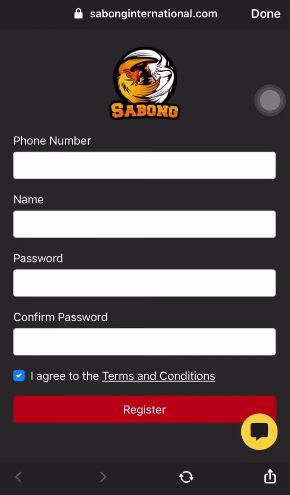
Online sabong registration opens the door to live cockfighting entertainment from your mobile device. For Filipino enthusiasts, creating an account takes 3-5 minutes when you have the right documents ready. This guide walks you through every registration step, document requirement, and common issue you might face during sign-up or login.
Quick Registration Process
Document Requirements for Verification
Age and Eligibility Requirements
Common Registration Problems and Solutions
Account Security Best Practices
Login Issues and Quick Fixes
VPN and Access Policies
Support Contact Methods
Responsible Gaming Note
Frequently Asked Questions
Most sabong platforms offer straightforward account creation. Here's what the process looks like:
Step 1: Access the Platform Visit the official sabong website or download the mobile app. Make sure you're on the legitimate platform — check the URL carefully and avoid third-party sites claiming to offer registration services.
Step 2: Click Register/Sign Up Look for the registration button, displayed prominently on the homepage. You'll be directed to a form requesting basic information.
Step 3: Fill Out Required Information Enter your personal details accurately. Common fields include:
-
Full name (as it appears on your ID)
-
Mobile number (for OTP verification)
-
Email address
-
Date of birth (must be 18+ years old)
-
Password (create a strong combination)
Step 4: Verify Your Mobile Number Most platforms send an OTP (one-time password) via SMS to your registered mobile number. Enter this code within the time limit of 5 minutes.
Step 5: Complete Initial Setup Some platforms ask for additional details like preferred payment method or security questions. Fill these out to finalize your account creation.
Your account becomes active immediately after verification. You'll need to complete document verification before making your first withdrawal — more on that below.
Document Requirements for Verification
Account verification (KYC - Know Your Customer) is mandatory on regulated sabong platforms. Prepare these documents before registering to avoid delays when you want to cash out:
|
Document Type |
Accepted Forms |
Requirements |
|
Government ID |
Philippine Passport, Driver's License, UMID, SSS ID, Postal ID |
Clear photo, all corners visible, not expired |
|
Proof of Age |
Same as Government ID |
Must show you're 18 years or older |
|
Proof of Address |
Utility bill, bank statement, barangay certificate |
Issued within last 3 months, shows current address |
|
Selfie Verification |
Photo holding your ID |
Face clearly visible, ID details readable |
Document Photo Tips:
-
Use good lighting — no shadows on the document
-
Capture all four corners of the ID or document
-
Ensure text is readable and not blurred
-
File size under 5MB per image
-
Accepted formats: JPG, PNG, PDF
Upload documents through your account dashboard under "Profile" or "Verification" sections. Processing takes 24-48 hours on most platforms, though some complete verification within a few hours during business days.
Age and Eligibility Requirements
Philippine law restricts online sabong to adults only. Here's what you need to qualify:
-
Minimum age: 18 years old (strictly enforced)
-
Residency: Must be physically located in the Philippines when registering and playing
-
Identity: One account per person — duplicate accounts lead to permanent bans
-
Capacity: Not be self-excluded from gambling activities
Platforms verify your age through your government-issued ID during the KYC process. Attempting to register with false information results in account suspension and forfeiture of any funds.
Restricted Individuals:
-
Anyone under 18 years old
-
Individuals on self-exclusion lists
-
Persons with multiple existing accounts
-
Those providing fraudulent documents
Common Registration Problems and Solutions
|
Problem |
Possible Cause |
Solution |
|
Email Already Registered |
The email address was previously used to create an account or someone attempted registration using your email. |
Use the “Forgot Password” option to reset login credentials. |
|
Mobile Number Verification Failed |
OTP (one-time password) not received or entered incorrectly. Network delays or incorrect number format can also cause issues. |
Check your mobile signal, confirm the correct phone number format (including country code), wait 2–3 minutes for SMS delivery, and request a new OTP code if the first expires. |
|
Country Restriction Error |
The platform detects access from a location where registration or betting is not allowed under its licensing rules. |
Ensure you are accessing the platform from a supported country. If you are traveling, wait until you are back in a permitted jurisdiction before registering. |
|
Document Rejection During Verification |
Identity documents do not meet platform requirements. Common issues include expired documents, poor image quality, or mismatched information. |
Upload a clear photo of a valid government ID that matches your registration details. |
|
Account Verification Pending |
The platform requires additional identity or payment verification checks. |
Wait for the review process to finish or contact customer support if verification takes longer than the typical processing timeframe. |
|
Password Creation Error |
Password does not meet the platform’s security requirements. |
Create a password with 8-16 characters, including a mix of letters, numbers, and special characters, according to the platform’s security rules. |
Account Security Best Practices
Protect your sabong account with these security measures:
Strong Password Creation:
-
Minimum 8 characters combining letters, numbers, and symbols
-
Avoid obvious choices (birthday, phone number, "password123")
-
Never reuse passwords from other accounts
-
Change your password every 3-6 months
Two-Factor Authentication (2FA): Some platforms offer 2FA through SMS or authenticator apps. Enable this feature in your account settings for an extra security layer.
Login Safety:
-
Never share your login credentials with anyone
-
Don't save passwords on shared or public devices
-
Log out after each session, especially on mobile
-
Avoid public WiFi when accessing your account
-
Verify the website URL before entering credentials
Monitoring Your Account: Check your transaction history regularly for unauthorized activity. Report suspicious logins or bets you didn't place immediately.
Login Issues and Quick Fixes
Trouble accessing your account? Try these solutions:
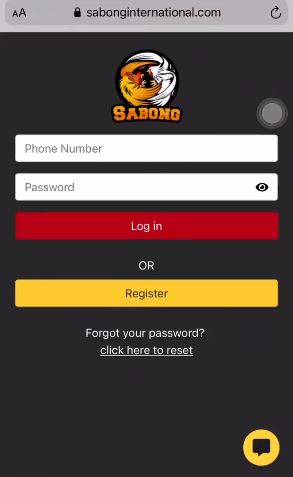
Forgot Password Click "Forgot Password" on the login page. Enter your registered email or mobile number. You'll receive a reset link or code — follow the instructions to create a new password.
Account Locked After Multiple Failed Attempts Most platforms lock accounts temporarily after 3-5 wrong password attempts. Wait 15-30 minutes, then try again. If the problem continues, contact support to verify your identity and unlock the account.
Account Suspended or Disabled Suspensions happen for terms of service violations, failed KYC verification, or suspicious activity. Check your email for notification from the platform explaining the reason. Contact support with valid identification to resolve the issue.
Browser or App Issues
-
Clear your browser cache and cookies
-
Update your mobile app to the latest version
-
Try a different browser (Chrome, Firefox, Safari)
-
Disable VPN or proxy services (see below)
-
Check your internet connection stability
VPN and Access Policies
VPN Usage on Sabong Platforms:
Most PAGCOR-regulated sabong platforms prohibit VPN usage because licensing requires players to be physically located in the Philippines. Using a VPN can trigger:
-
Account suspension
-
Withdrawal delays or denials
-
Confiscation of winnings
-
Permanent account closure
Why VPNs Are Blocked: Regulatory compliance requires geolocation verification. PAGCOR licenses only permit operations within Philippine territory, so platforms must confirm your actual location through your IP address and GPS data (on mobile).
Legitimate Access Methods: If you're in the Philippines but experiencing access issues, don't resort to VPNs. Instead:
-
Switch from mobile data to WiFi (or vice versa)
-
Restart your router to get a fresh IP address
-
Contact your internet provider if the site seems blocked
-
Reach out to platform support — they can whitelist your IP if needed
Mirror Sites: Some platforms operate mirror domains (alternative URLs) for technical redundancy, not to bypass restrictions. Only use official mirrors listed on the platform's verified social media accounts or sent via official email.
Support Contact Methods
When you encounter registration or login problems, quick support access matters. Save these contact options:
-
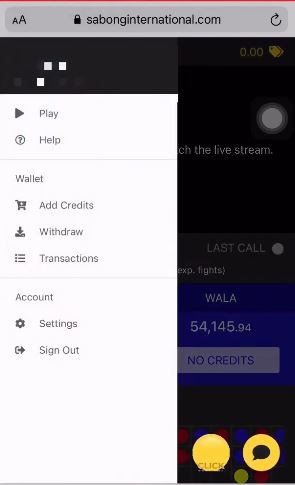
Live Chat: Available on most sabong platforms during operating hours. Look for the chat bubble icon in the bottom-right corner of the website or app. Response times range from instant to 5 minutes during peak hours.
-
Facebook Messenger: Many Philippine sabong platforms maintain active Facebook pages with Messenger support. This option works well outside regular business hours, though responses may be delayed.
-
SMS Hotline: Some platforms offer SMS-based support where you can text your account number and issue. This works when you can't access the website or app.
-
Telephone Support: Premium platforms provide phone support during business hours. Call this option when dealing with account lockouts or urgent withdrawal concerns.
Responsible Gaming Note
Online sabong is entertainment for adults 18 years and older. Set deposit limits before you start playing and never bet more than you can afford to lose. If you feel you're developing a gambling problem, seek help through the PAGCOR Responsible Gaming Program at 1-800-88888 or visit a counseling center. Self-exclusion options are available through your account settings or by contacting platform support directly.
Frequently Asked Questions
How long does sabong registration take?
Registration takes 3-5 minutes when you have all required information ready. Document verification adds another 24-48 hours before you can make withdrawals, though you can start playing immediately after account creation.
Can I register multiple accounts for bigger bonuses?
No. One account per person is strictly enforced. Platforms detect duplicate accounts through your ID documents, mobile number, device fingerprint, and IP address. Creating multiple accounts violates terms of service and results in permanent bans with fund confiscation.
What happens if I enter the wrong birthdate during registration?
Contact support immediately before uploading verification documents. If your ID shows a different birthdate than your registration details, your verification will fail. Some platforms allow corrections before KYC submission; others require creating a new account with accurate information.
Do I need a bank account to register?
Bank account ownership isn't required for registration, but you'll need a valid payment method (bank account, e-wallet like GCash or PayMaya, or over-the-counter options) to deposit and withdraw. You can register first and link payment methods later through your account dashboard.
Can I change my registered mobile number later?
Most platforms allow mobile number updates through your account settings, but the process requires identity verification for security. You'll need to contact support with your ID and a selfie, then verify the new number via OTP. The change takes 24-48 hours to process.
Why does my account show as unverified after registration?
Unverified status means you haven't completed KYC document submission yet. You can log in and browse the platform, sometimes even make deposits, but withdrawals are blocked until verification completes. Upload your ID and proof of address in the verification section to remove this restriction.
Rating
★
★
★
★
★
0.0
Votes: 0